
Description
- Brand Name: Makerbase
- Origin: CN(Origin)
- Item Type: Display Screen
- Model Number: CNC offline device
- Online: 7 type languages
- Axis: X,Y,Z
- Compatible: CNC 3018
- Note: None SD card
The controllers already pre-installed firmware.
Name: MKS DLC

Wiring

PINOUT

Size

Drivers Parameters

Caution!
Please mind the power polarity and drivers direction.
Please don’t put the drivers or motors on/off when power on.
Please disconnect all motors when adjust driver current.
MKS TFT35 Touch Screen

Wiring

Size

How to Use
Firmware Download and Update
https://github.com/Macrobase-tech/CNC-Firmware
1. Install Xloader to PC,upload GRBL firmware to CNC board.
Select baud rate 115200.

2. Display firmware update
Select baud rate 115200 on TFT35 config.
Copy below files to SD card and plug it to TFT35 display.

3.Wire TFT35 to Aux-1 of CNC board.Then put board’s power on,it will update automatically.
4. Read G-code
Copy G-code to SD card,plug it to the display.(SD card:1g-16g,Gcode format is nc.)
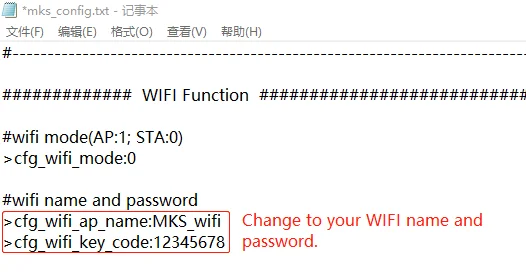
How to Use WIFI.
1.Connect to your WIFI.Enable WIFI on TFT config.And update the firmware to display.
2.Install MKSLaser APP to Phone.

Reviews
There are no reviews yet.